Sign in with Touch ID
A “Mac Touch ID” tile is the default on the Windows sign-in screen. Pick it and confirm with your finger on the Mac. The password stays in your macOS login keychain.
 Cove for macOS · Apple Silicon
Cove is a Mac app that runs Docker containers, Linux machines and Windows 11 on ARM. It is built on hvmm, our own virtual machine monitor, written in Rust on Apple’s Hypervisor.framework.
Windows apps open as ordinary Mac windows, each with its own Dock icon.
Cove is in development. There is no public download yet.
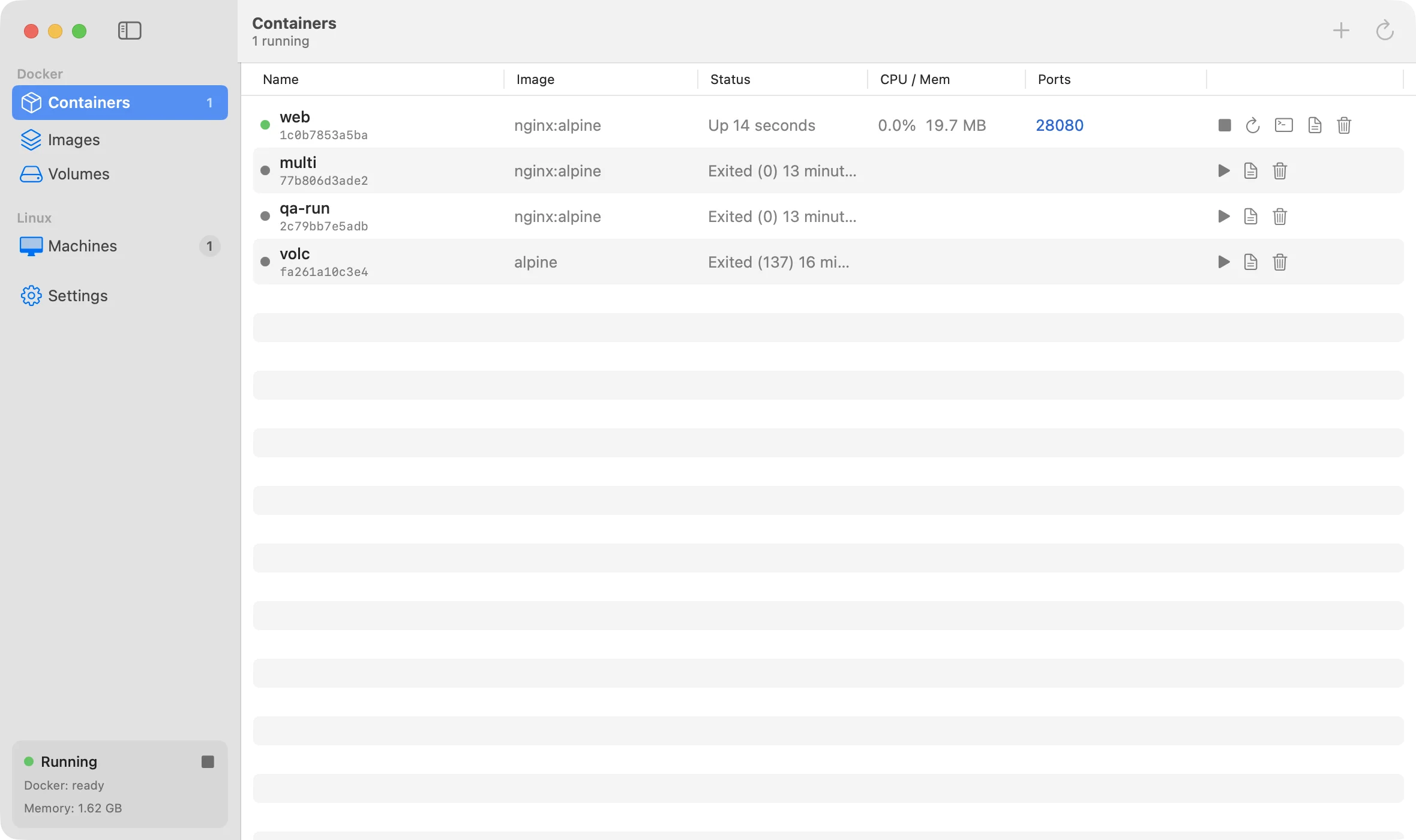
A Docker engine runs in a small Linux VM. Point DOCKER_HOST at ~/.cove/docker.sock and keep using the docker CLI. Published ports show up on localhost by themselves.
Alpine and Ubuntu (24.04, 22.04) machines, created from the app or with cove create. They run the distro’s own init (systemd on Ubuntu), use your Mac user name and uid, and get a name.cove.local hostname.
linux/amd64 images and builds run through FEX-Emu, with qemu-user as the fallback. Emulated code is slower than native arm64, but it works with the same docker commands.
Import an existing Windows 11 ARM disk, or install from an ISO. The optional automatic setup creates the account, installs the drivers and prepares Windows for Cove without a single click.
Cove lists your Windows apps: pinned, recent and all. Click one and it opens as its own Mac window with its own Dock icon. The full Windows desktop is one button away.
Type your Windows password once. Cove keeps it in your login keychain, and from then on you sign in to Windows with Touch ID on the Mac.
Windows apps you have used show up in Finder’s Open With menu as “Notepad (Cove)”, “Paint (Cove)” and so on. Cove never takes over your default apps.
Linux machines mount your Mac home folder at the same path through virtio-fs, so Mac paths work unchanged inside the machine. Docker bind mounts of Mac folders work the same way.
A userspace NAT gives every VM internet access, IPv6 and DNS without root. VMs reach each other by name on a private bridge, the Mac is host.cove.internal, and servers in Linux machines and containers are forwarded to localhost.
Suspend a Linux machine to disk with cove suspend and resume it later with its processes still running. The Docker VM can do the same on every stop, so it starts again in about a tenth of a second (opt-in).
Memory a Linux guest frees is returned to macOS by free page reporting, and idle page cache is trimmed after a few minutes. Windows guests get an automatic balloon policy.
Cove.app is a native SwiftUI app with a menu bar extra, in English and Traditional Chinese. The cove command line tool manages machines, Docker and Windows from the terminal.
A “Mac Touch ID” tile is the default on the Windows sign-in screen. Pick it and confirm with your finger on the Mac. The password stays in your macOS login keychain.
Each Windows app gets its own Mac window and Dock icon. The menu bar shows your pinned and recent apps, so you can start one without opening Cove.
Choose “Open With > Notepad (Cove)” in Finder. Cove copies the file into Windows and opens it there. Saving in Windows does not change the Mac file. Programs and scripts are never handed to shells or script hosts.
Windows boots at the size of your Mac screen with 200% scaling, so text stays crisp. A new size takes effect at the next boot.
Start, shut down or restart Windows from the app or the menu bar. “Quit and Stop VMs” shuts Windows down cleanly; a plain Quit leaves it running.
Give Cove a Windows 11 ARM ISO, an account name and a password. Windows Setup, the VirtIO drivers and OpenSSH are installed with no input during the install.
A virtual machine monitor written in Rust. It uses Apple’s Hypervisor.framework directly, not Virtualization.framework, with the in-kernel GICv3 interrupt controller. Linux guests boot a custom 6.18 kernel. Windows boots through EDK2 UEFI firmware with ACPI tables generated by hvmm.
virtio block, network, file system (virtio-fs), vsock, balloon, GPU, input and console devices, plus NVMe, an AHCI CD-ROM and a USB keyboard and tablet for Windows. The virtio, NVMe and firmware device parsers were fuzzed against hostile guest input, one million cases per harness, with no panics.
A per-user background service. It runs one hvmm process per VM, serves the Docker socket, keeps DNS names and port forwards up to date, watches guest health, and adopts VMs that are still running after it restarts.
The SwiftUI app and the cove CLI talk to coved over a local socket. For Windows, an agent in the guest sends each app window to the Mac as its own H.264 stream, and the viewer draws it with Metal and sends keyboard and mouse input back.
docker run --rmWarm engine, container start to exit. OrbStack: 0.24 s.MacBook Air M4, 16 GB, macOS 27
Published port readydocker run -d -p until the first HTTP response. OrbStack: 0.16 s.MacBook Air M4, 16 GB, macOS 27
HTTP through -p, new connectionsab -c 32, a new TCP connection per request. OrbStack: 11.0k req/s.MacBook Air M4, 16 GB, macOS 27
TCP round trip, container to MacMedian request/response latency. OrbStack: 48.5 µs.MacBook Air M4, 16 GB, macOS 27
Bind mount: untar 20k filesInto a Mac folder mounted in the container. OrbStack: 2.82 s.MacBook Air M4, 16 GB, macOS 27
Bind mount: npm ciOn a Mac folder mounted in the container. OrbStack: 1.50 s.MacBook Air M4, 16 GB, macOS 27
Bind mount: git status, cold50,000-file repository on a Mac folder. OrbStack: 3.28 s.MacBook Air M4, 16 GB, macOS 27
Mac edit seen in containerFile change on the Mac until inotify fires in the container. OrbStack: 70 ms.MacBook Air M4, 16 GB, macOS 27